What is Open WebUI?
Open WebUI is a web-based user interface that allows you to interact with AI models. It provides a simple and intuitive way to generate text, images, and more using an interface we use daily: chat. It is said that mastering the use of Open WebUI is a rocky road which is not wrong but that’s where SleekChat comes in. SleekChat’s mission is to get entangled with Open WebUI from the start and make your life easier in running your own instances of Open WebUI. It doesn’t stop there, we write guides (like this one you’re reading now) to help you get started with Open WebUI and make the most of its features. Over time, our docs site will be grown to write about real world use cases leveraging Open WebUI. Have you ever had a phone call with an AI? Well if you haven’t, you’re about to! That’s just scratching the surface of what Open WebUI can do.What is OpenAI?
OpenAI is the company behind the infamous ChatGPT. Since they released ChatGPT to the public, the shape of our world has changed, and in our opinion for the better. It is SleekChat’s belief that AI will in the near future bring more prosperity to the world than any other technology humans have ever created.AI Models
Year after year, OpenAI and other AI models providers out there both open source and closed source are pushing the boundaries of what is possible with AI. The models you use today will quickly be outsmarted by the next foundation models sometimes within months if not weeks. This means that the workflows you created today through prompts will be even smarter tomorrow. You won’t have to adapt your workflows to the new models, they will adapt to you. This is the beauty of Open WebUI + OpenAI.Bring Your Own Keys
Open WebUI gives you the ability to use your own OpenAI API key. You pay as you go, simple. Let us tell you about the benefits of using your own API key below.Benefits of Using Your Own API Key
First and foremost, your content stays private. Any data you send to OpenAI is not stored or used for training purposes. This means you can use Open WebUI without worrying about your data being shared or misused. More about OpenAI’s policy is shared in the link below: https://platform.openai.com/docs/guides/your-data As you use your API key, you can also take advantage of the cost savings associated with using your own API key. OpenAI offers a pay-as-you-go pricing model, which means you only pay for what you use. This can be more cost-effective than using a third-party service that charges a flat fee. Apart from generating text using OpenAI’s models, you can also use your API key to access other features such as image generation, audio transcription, and more. This allows you to capitalize on a wide range of use cases that leverage the power of OpenAI’s models.Rate Limits
When using your own OpenAI API key, you are subject to the rate limits set by OpenAI. These limits vary depending on the model you are using and your usage so far. You can find more information about the rate limits in the OpenAI documentation. More info about the rate limits OpenAI has is shared in the link below: https://platform.openai.com/docs/guides/rate-limits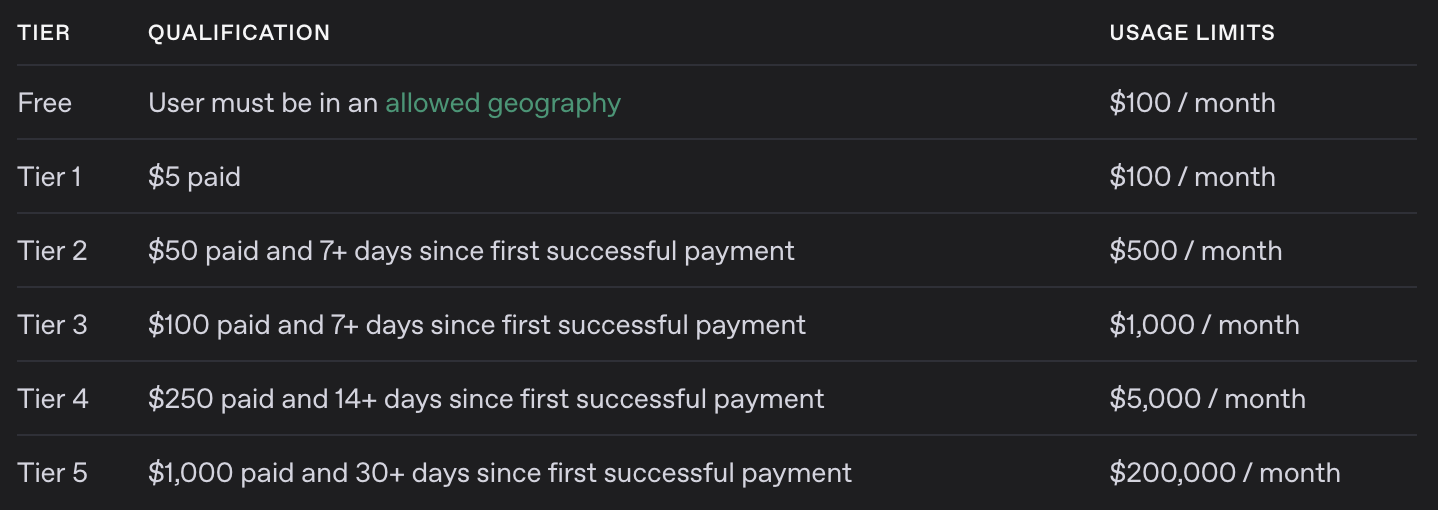
For brevity, here’s a screenshot of the rate limits page as of April 27th, 2025. As you can see, the more you use and the longer you use it for, the higher the rate limit.
Multi Modality
Open WebUI is a multi-modality application, which means it can handle multiple types of data. This includes text, images, audio, and more. By using your own OpenAI API key, you can take advantage of these features and build use cases that leverage the power of OpenAI’s models.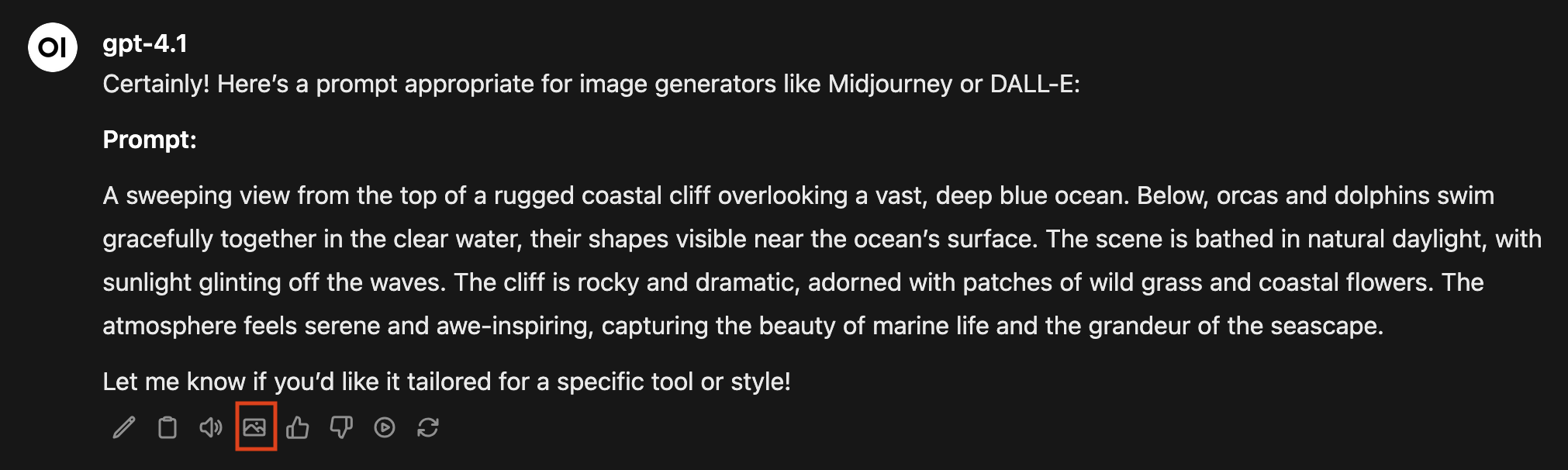
Here’s an example of an Image prompt generated by OpenAI’s GPT 4.1. Clicking on the icon marked with a red rectangle will generate an image using OpenAI’s Dall-E model.

The generated image.